> For the complete documentation index, see [llms.txt](https://actionmu.gitbook.io/actionmu/llms.txt). Markdown versions of documentation pages are available by appending `.md` to page URLs; this page is available as [Markdown](https://actionmu.gitbook.io/actionmu/problems-solution/infinite-loading-screen.md).
# Infinite loading screen
**CHARGING FAILING?**\
\
**Is your game closing after clicking "PLAY" in the launcher? Follow the steps below. Video:**
 **PASSO 1**
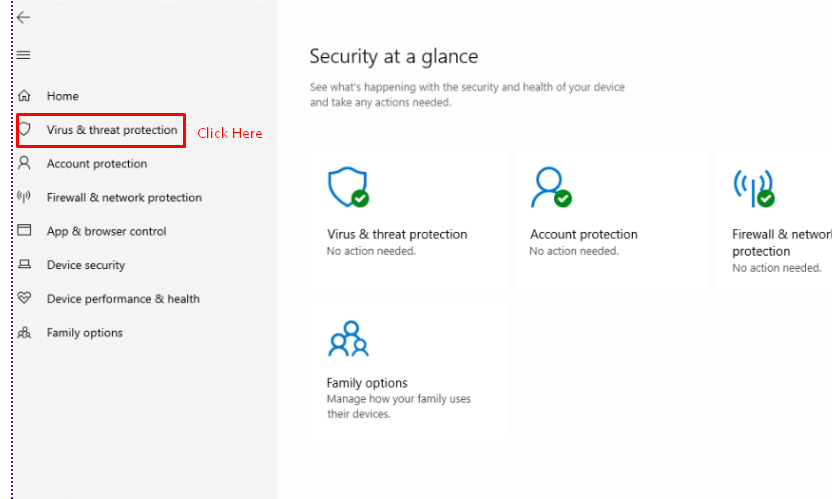
**Check your Windows Defender, it is probably blocking some actionmu file.**
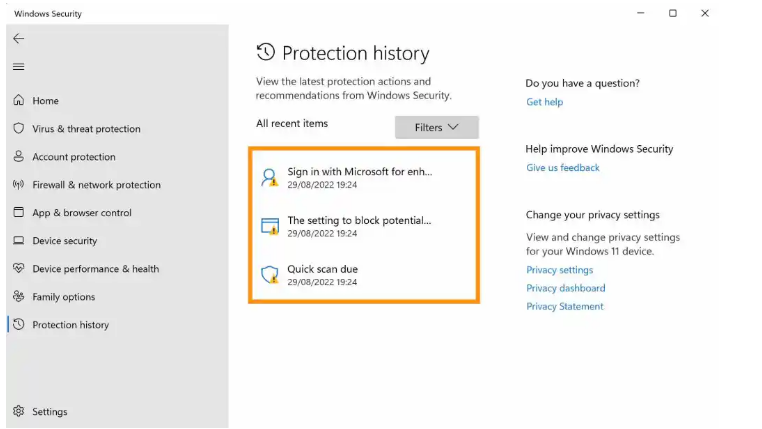
**Now you will locate the option ****\[Protection history]**** and press it. Go open a new tab, now just identify the blocked file and press ****\[Allow]**
**Now it's easy, identify the ACTIONMU file, normally it has the name Trojan:Win32, select an action \[Allow] and your problem will be solved.**